
Before You Begin
- Only the Organisation Admin is able to delete organisation data.
- Deleting organisation data is a permanent action.
- Once completed, your organisation's data cannot be recovered.
- Organisation data must be deleted before connecting a different accounting organisation or switching accounting platforms.
When Would I Need to Delete My Organisation Data?
You may need to delete your organisation data if:
- The wrong accounting organisation was connected during setup.
- You want to connect a different Xero organisation.
- You want to switch from Xero to MYOB.
- You want to switch from MYOB to Xero.
What Happens to My Scenarios?
Deleting your organisation data will delete any Scenarios created within your organisation.
However, deleting organisation data does not reset or remove your previous Scenario usage.
For example, if your subscription includes Scenario usage limits, deleting your organisation data will not restore or reset any Scenarios that have already been used.
Step 1. Open My Organisation
Navigate to: Setup → My Organisation
Step 2. Locate Advanced Settings
Scroll to the bottom of the page and expand Advanced Settings.
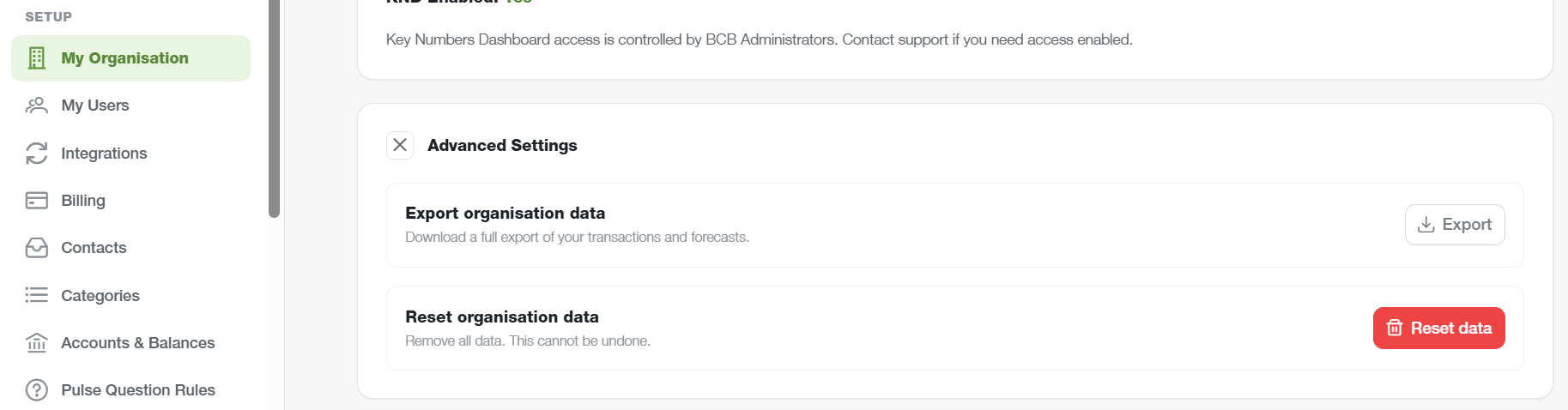
Step 3. Select Reset Organisation Data
Under Reset organisation data, click Reset data.
Step 4. Confirm the Reset
A confirmation window will appear advising that the action will irreversibly delete all organisation data.
Type DELETE into the confirmation field.
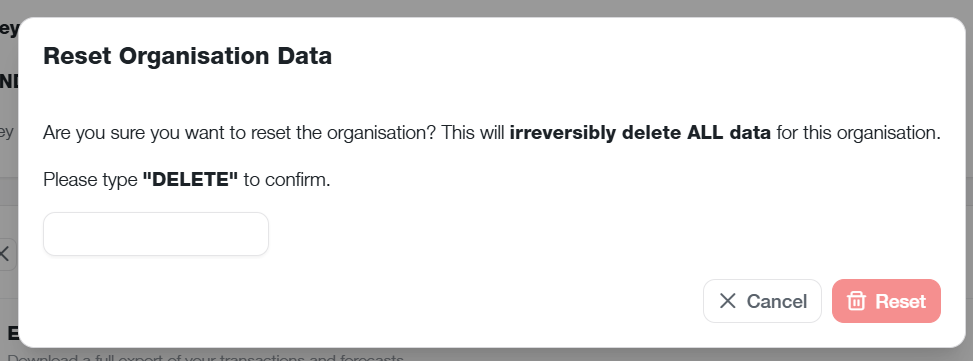
Step 5. Reset the Organisation
Click Reset to permanently delete your organisation data.
Important Information
- BCB supports a single accounting software connection per organisation.
- Disconnecting an integration alone does not allow a different accounting organisation or platform to be connected.
- Organisation data must be deleted before connecting a different accounting organisation or switching accounting platforms.
- Deleting organisation data permanently removes the information stored within your BCB organisation.
- Any Scenarios created within your organisation will also be deleted.
- Previous Scenario usage is not reset when organisation data is deleted.
- If you are unsure whether deleting organisation data is the appropriate action, contact BCB Support before proceeding.