
- How often does BCB sync data from my integration?
BCB automatically syncs connected integrations based on your configured sync schedule.
The available sync frequencies depend on your subscription plan and integration settings.
By default, data syncs daily at 00:00UTC

- Can I change the sync frequency?
Yes. Where available, sync settings can be managed from the Integration Centre.
Available sync frequencies depend on your subscription plan. - How do I change my sync frequency?
You can change your sync frequency through the Integration Centre
To update your sync settings:
1. Navigate to Setup -> Integration Centre
2. Locate the integration you would like to update
3. Select the dropdown arrow next to Sync Now
4. Select Connection Settings
5. Open the Sync tab
6. Select your preferred sync frequency from the dropdown list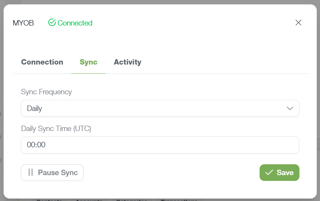
Available sync frequencies may include:
- Daily
- Every 12 hours
- Every 6 hours
- Every hour
- Every 30 minutes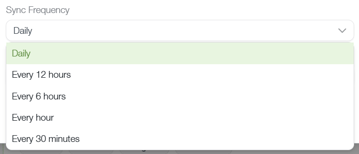
You're also able to change the Daily Sync Time (UTC)
- Can I manually sync my data?
Yes. Navigate to the Integration Centre and select Sync Now on the integration you'd like to refresh.
- How long does a sync take?
Most syncs complete within a few minutes. The duration depends on factors such as:
- The size of the dataset
- The integration being synced
- System load
- Whether it is the first sync for that integration - Why is my sync taking a long time?
Initial syncs and large datasets may take longer to process than normal.
If a sync appears to be taking unusually long:
- Allow additional time for processing.
- Check the integration status.
- Attempt another manual sync.
- Disconnect and reconnect the integration if appropriate.
If the issue persists, submit a Support Request. - What does 'sync failed' mean?
A sync failure indicates that BCB was unable to successfully retrieve data from the integration.
Try performing a manual sync. If the issue continues, check your integration connection and permissions before contacting support.
- What data is pulled into BCB?
Depending on the integration, BCB may sync:
Xero / MYOB
- Contacts
- Accounts
- Categories
- Transactions
Simpro
- Contacts
- Categories
- Jobs
- Quotes
This information helps support forecasting, reporting, operational visibility and scenario modelling. - Why is my data not appearing after a sync?
If data isn't appearing after a sync:
- Verify the integration is connected.
- Review the sync status.
- Trigger a manual sync.
- Allow a few minutes for processing.
- If information still appears to be missing, submit a Support Request for investigation. - Does BCB update in real time?
No. BCB updates based on your configured sync schedule rather than continuously in real time.
This helps ensure data remains stable and consistent across connected systems.