
Apollo helps you create new forecast transactions using plain-language instructions.
Rather than manually creating forecast entries, you can describe a business change and Apollo will propose forecast transactions that reflect the expected impact on your future cashflow.
Describe Business Changes in Plain Language
Apollo understands requests written in everyday language.
For example:
- Hire two tradespeople in January
- Purchase a new company vehicle next quarter
- Add a monthly software subscription
- Increase supplier costs by 10%
Apollo converts these requests into forecast transactions that can be reviewed before being added to a scenario.
Apollo Can Add Forecast Transactions
Apollo currently supports creating new forecast transactions within a scenario.
Examples include:
- New expenses
- Planned purchases
- New recurring costs
- Additional revenue
- Staffing costs
- Business growth initiatives
These forecast transactions can then be reviewed as part of the scenario before any decisions are made.
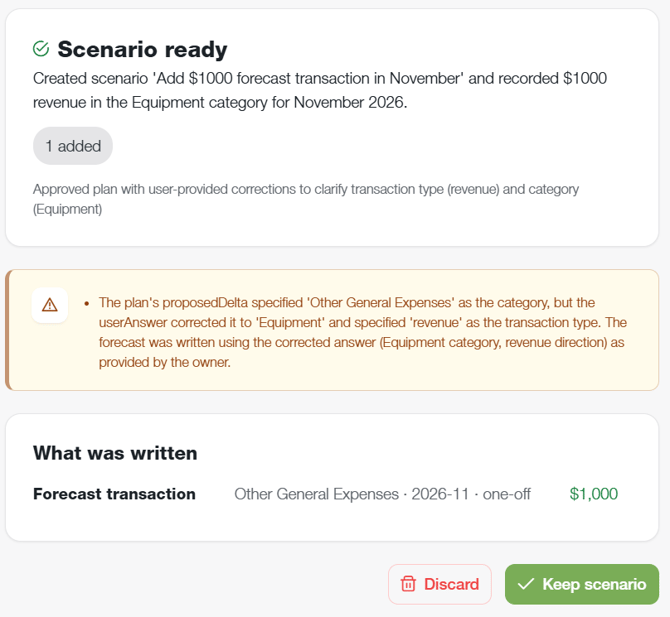
Apollo May Ask Follow-Up Questions
If additional information is required, Apollo may ask questions to better understand the change you want to model.
Examples include:
- When should the change occur?
- How much will it cost?
- Is the expense recurring?
- Is it revenue or an expense?
The more detail you provide, the more accurately Apollo can model the scenario
Apollo Can Make Assumptions
If information is not provided, Apollo may make reasonable assumptions based on the information available.
Examples include:
- Expected start dates
- Timing assumptions
- Cost assumptions
- Recurring schedules
These assumptions are displayed before the scenario is created so they can be reviewed and validated.
Review The Result Carefully
Before relying on a scenario, review:
- Forecast amounts
- Dates
- Categories
- Timing
- Apollo assumptions
Check that the resulting forecast transactions match what you intended to model.
What Apollo Cannot Do
Apollo currently supports adding new forecast transactions.
Apollo does not currently:
- Modify existing baseline forecast transactions
- Remove existing baseline forecast transactions
- Change transactions imported from connected systems
Scenarios Remain Separate From Your Baseline
Creating a scenario does not change your baseline forecast.
Reviewing a scenario and applying a scenario are separate actions.
You can:
- Create a scenario
- Review the results
- Compare it with your baseline
- Update the scenario
Without affecting your primary forecast
Applying a Scenario Is a Separate Decision
If you choose to apply a scenario, the forecast changes become part of your baseline forecast.
Before applying:
- Review assumptions
- Review transaction amounts
- Check dates and timing
- Confirm the scenario reflects your intended changes
There is currently no undo-scenario button after applying, so ensure you're comfortable with the result before confirming.
Why Use Apollo?
Apollo helps reduce the effort involved in building forecast scenarios by:
- Creating forecast transactions automatically
- Asking clarifying questions when needed
- Explaining assumptions
- Showing exactly what was created
- Helping evaluate future business decisions
- Turning ideas into measurable forecast outcomes